Mapping
This section describes how the pixels carried on the HDMI link are mapped onto the native video interface for each of the supported color spaces. The IP-core supports RGB 4:4:4, YCbCr 4:4:4, YCbCr 4:2:2 and YCbCr 4:2:0. In a 4:4:4 format every pixel carries a complete set of three components: red, green and blue for RGB, or luma (Y) together with both chroma components (Cb and Cr) for YCbCr. RGB 4:4:4 and YCbCr 4:4:4 share an identical bit layout on the video interface; only the interpretation of the three components differs, so the same datapath handles either color space without structural changes. In YCbCr 4:2:2 the chroma is horizontally subsampled: each pixel keeps its own luma sample, but a single Cb/Cr pair is shared between two neighbouring pixels. In this mode the HDMI specification always transports the color components using 12 bits per component, with the active data MSB-aligned regardless of the source color depth. In YCbCr 4:2:0 the chroma is subsampled both horizontally and vertically: every pixel keeps its own luma sample, and one chroma sample serves a block of two by two pixels. HDMI carries a 4:2:0 line as pixel pairs. Each slot of the video interface holds two horizontally adjacent pixels: the luma of the even pixel on green (TMDS channel 1), the luma of the odd pixel on red (TMDS channel 2), and one chroma sample on blue (TMDS channel 0). The chroma alternates per line, starting with Cb: the first active line of a frame carries Cb, the second Cr, the third Cb again, and so on. In the figures the first active line is line 0, so Cb is on lines 0, 2, 4 ... and Cr on lines 1, 3, 5 ... The packing into pixel pairs is done by the video source, so the source runs the horizontal timing (total, active, sync start and sync width) at half the number of pixels, and the TMDS character rate is half that of 4:4:4. HDMI 2.0 allows 4:2:0 for the 3840 x 2160 and 4096 x 2160 formats at 50 and 60 Hz, and only when the sink reports 4:2:0 support in its EDID. The pixels are processed in parallel on every clock cycle. The IP-core can be configured for dual pixels per clock (2 PPC) or quad pixels per clock (4 PPC). On each clock cycle the interface transports 2 or 4 consecutive pixels of a video line.
Color depth
The width of a component on the video interface is set at design time with the parameter P_BPC (bits per component). The video data bus is 3 * P_PPC * P_BPC bits wide.
| P_BPC | Supported color depths | Bus width 2 PPC | Bus width 4 PPC |
|---|---|---|---|
| 8 | 8 bits | 48 bits | 96 bits |
| 10 | 8 bits and 10 bits | 60 bits | 120 bits |
With P_BPC = 8 the IP-core supports 8-bits video only. Each component occupies 8 bits and each pixel 24 bits.
With P_BPC = 10 each component occupies 10 bits and each pixel 30 bits. The color depth of the video stream, 8 or 10 bits, is then selected at run time when the video is started.
For 10-bits video all ten bits of a component are used. For 8-bits video only the upper byte of each component is used: the 8-bits value is placed in bits [9:2] of the component and the two LSBs are not used. The transmitter ignores these bits and the receiver drives them to zero.
YCbCr 4:2:2 is carried on the HDMI link with the same 24 bits per pixel as 8-bits video, so in a 10-bits configuration it also uses the upper byte of each component.
YCbCr 4:2:0 follows the color depth like 4:4:4: in a 10-bits configuration a 4:2:0 stream can be 10 bits, using all ten bits of a component, or 8 bits in the upper byte.
The figures below show how the pixels and their components are distributed across the interface for each configuration. In the 10-bits figures xx denotes the two unused LSBs of a component.
8 bits per component (P_BPC = 8)

Figure 1: Video mapping - 4 pixels per clock, P_BPC = 8 (click on the image to enlarge it)

Figure 2: Video mapping - 2 pixels per clock, P_BPC = 8 (click on the image to enlarge it)
10 bits per component (P_BPC = 10)
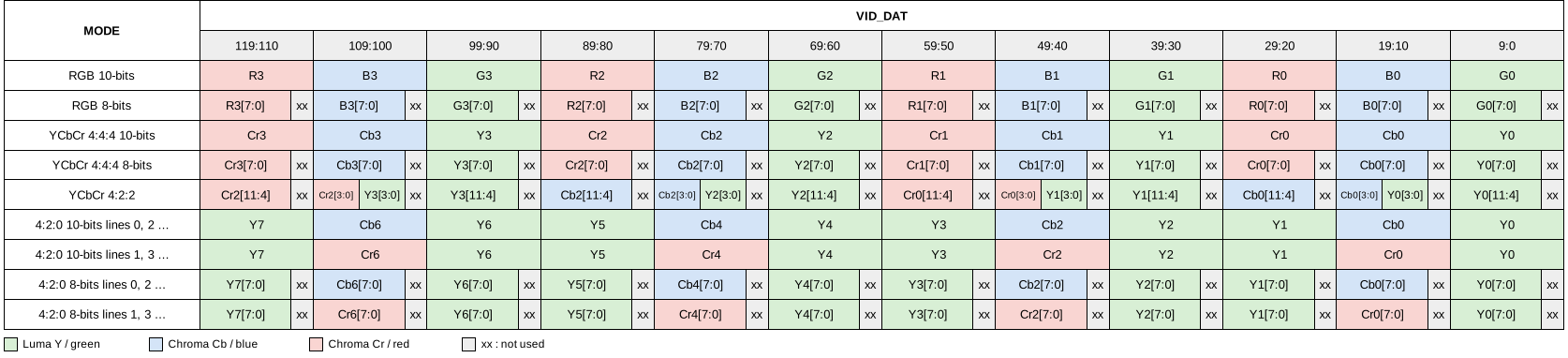
Figure 3: Video mapping - 4 pixels per clock, P_BPC = 10 (click on the image to enlarge it)
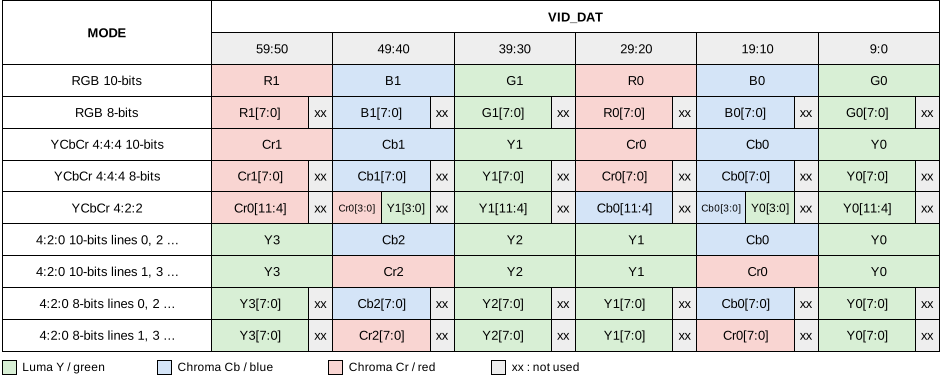
Figure 4: Video mapping - 2 pixels per clock, P_BPC = 10 (click on the image to enlarge it)